
Acrobat Projects
Introductory
Acrobat is used in almost every position of employment as well as real world settings. As we live in a digital world, many things are done digitally and over PDF files. Interactive PDF files specifically are important and used for many reasons, but most commonly private forms (such as employment, agreements, etc.) Below, there's an Acrobat mailer with interactive checkboxes, so that it can easily be filled out digitally. There's also an Acrobat Catalog, which is also interactive and organized.
As an English major, I do a lot of writing, literary analysis, and reading literature and literary criticism. However, being able to understand how to use Acrobat and present that information in a method other than writing papers can be engaging for Library work (for example, if I were to design a programming for the local library that explores literature and analysis, I could use Acrobat to create interactive and engaging formats for those attending to be interested in learning about that topic. In a more literal sense, I could also create Acrobat documents for the library's website, detailing our services.)
Acrobat Mailer
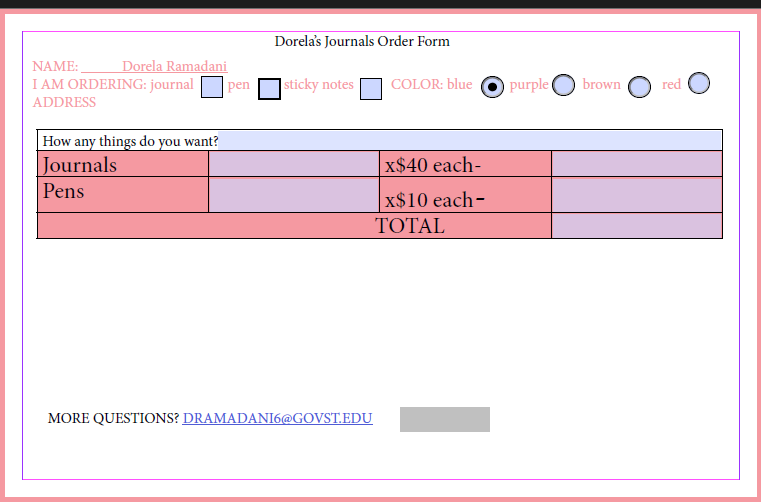
These skills can be used for many different projects: owning your own business and needing to make an order form, advertising, making a submission form for literary submissions (for indie magazines.) Working as a librarian, another example could be assisting with making a digital recommendations form for those that attend the library. (Library members can request new books, services, etc.)
The photo to the left is a web-friendly screenshot meant to showcase the work. There is a downloadable file below so that the interactive nature of the document can be accessed.
Acrobat Catalog


The Acrobat Catalog is an interactive catalog, organized and designed to be interactive so that you can click on the table of contents and have it link to the direct positioning of that heading/subheading. I love being an English major, but I do have to acknowledge that for many of the fields I love (journalism, writing, teaching), we are slowly moving to digital and out print format. (At least for many of the local jobs.) Having the knowledge of writing, analysis, and English in general, and being able to combine that with Acrobat + Word (with the catalog and mailer), makes the job market a little bit easier, because I understand both formats of written and digital work.
Screenshots of the Word Catalog are meant to display the work in presentation mode. To see the full, interactive catalog with page numbers click the downloadable file.


